
Microphone Blocker - Anti Spy
BytePioneers s. r. o.Libraries & Demo
4.5685.00 Reviews
- Version
- 1.86
- Installs
- 500.00K
- Age Rating
- Everyone
Screenshots
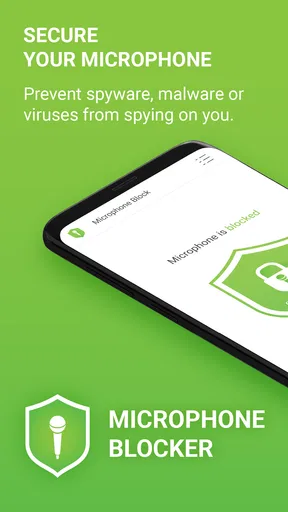

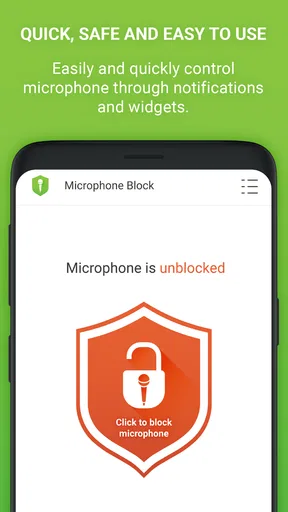
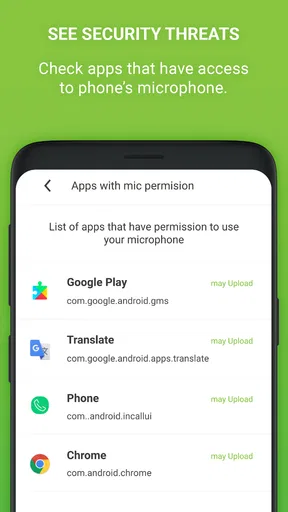
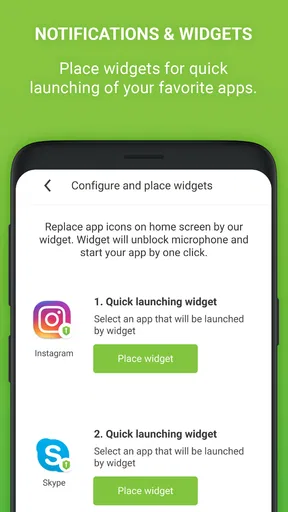
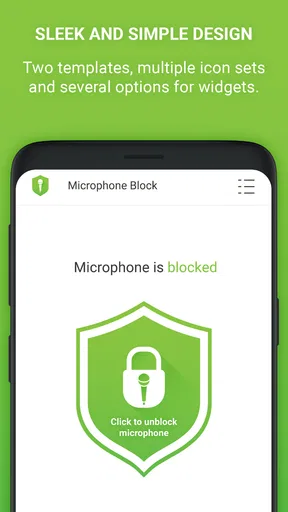
Our Review of Microphone Blocker - Anti Spy
 Analysis by Appyee
I judge microphone privacy tools by what happens after the first reassuring tap: do they fit naturally into a routine, and do they remain useful once the initial curiosity wears off? Microphone Blocker - Anti Spy is aimed at people who want a direct way to restrict microphone access rather than a complicated security dashboard. I’d see its lasting value less as a reason to worry about every app and more as a simple control to use deliberately when a microphone is not needed.
Why the first week can feel reassuring
The appeal is immediate because the purpose is easy to understand. Instead of working through each app’s settings one by one, you can use a dedicated blocker to put a broader barrier between apps and the microphone. BytePioneers s. r. o. publishes it in the libraries and demo category, but the practical idea is everyday privacy: make microphone access something you choose, not something you forget is available.
That broad control can be especially handy when you are settling into a new phone or reviewing a device that has accumulated apps over time. I would use the first few days to notice which situations genuinely call for the microphone—calls, voice messages, recordings, or voice features—and which stretches of the day are quiet. That small audit helps turn a privacy toggle into a useful routine rather than a button you tap once and then ignore.
A realistic routine, not a permanent lockdown
Picture a workday with a private meeting in the room, followed by a commute where you want to send a voice message, then an evening at home when you are not using voice features. A blocker is most useful when those changes in context matter to you: keep access restricted during the meeting, then restore it when a legitimate microphone task comes up. The point is not to treat every app as suspicious; it is to make access match what you are doing.
There is a trade-off here. A broad block can also get in the way of a trusted app at exactly the moment you need it. If a call, recorder, or voice message does not work as expected, the first sensible check is whether you have left the microphone restricted. That is a small bit of friction, but it is more predictable than trying to remember which of many individual app permissions you changed weeks ago.
Who will get the most from it
I think this approach suits people who rarely use voice functions and prefer a visible, deliberate control, as well as anyone who wants a straightforward way to limit microphone access during focused or private parts of the day. It may also help someone who is learning how app permissions work, because the central action is easier to understand than a long list of unrelated settings.
It is less suitable for someone who relies on voice assistants, frequent audio recording, hands-free calls, or apps that need the microphone throughout the day. In that case, repeatedly switching access on and off may become more irritating than useful. I would also avoid treating a blocker as a complete privacy solution: it addresses microphone access, not every way a phone can collect or share information. A person looking for broader privacy controls should combine careful permission choices with the phone’s own security settings rather than expecting one focused utility to cover everything.
Compared with the usual alternative—managing microphone permission separately for each app in the operating system—the dedicated blocker offers a simpler central habit, while individual permissions give finer control. Neither approach is automatically best. Per-app settings make sense when you want a map of which apps may use the microphone; a broad blocking tool makes more sense when your preference is to keep it unavailable for a while, then restore access when needed. I would choose based on how often your routine changes, not on a general claim that one method is safer in every case.
Getting Started with Microphone Blocker
First things first, let's talk about setting it up. The installation is a breeze. Just head over to the Play Store, download it, and you’re pretty much ready to go. Once installed, you’ll notice that the interface is clean and straightforward. You don't need to be a tech wizard to navigate through the app. It’s all about simplicity, which is something I really appreciate.
Features That Stand Out
Now, here’s where Microphone Blocker - Anti Spy really shines. The app has a feature that allows you to block all apps from accessing your microphone. You can activate this with just a tap. Once activated, a notification appears letting you know that the microphone is secured. It’s kind of like having a security guard for your phone.
Another cool feature is the app's ability to detect and alert you if any app tries to use your microphone. This is a lifesaver if you’ve got apps on your phone that you might not fully trust. Plus, it logs these attempts, so you can see which apps are trying to access your mic.
Performance and Usability
In terms of performance, I found the app to be pretty lightweight. It doesn’t hog your phone’s resources, which means you won’t notice any sluggishness. The battery consumption is minimal too, so you don't have to worry about the app draining your battery.
Usability-wise, the app is pretty intuitive. You have a main screen with easy-to-understand options. There’s no need to dig through complicated menus. Just open the app, hit the block button, and you’re set.
Keeping it useful after the novelty fades
The strongest reason to keep a microphone blocker installed is not the drama of imagining an unknown listener; it is the ordinary convenience of having one clear place to change a setting. For me, that means using the block during periods when I have no reason to record or speak to an app, then switching it off before an audio task. The notification can serve as a quick reminder of the current state, which matters because a restriction you forget about can look like a broken microphone.
I would make the attempt log useful rather than treating every entry as proof of wrongdoing. A microphone request can come from a feature you intentionally opened, or from an app whose purpose includes audio. If an unfamiliar app appears, check whether its function reasonably explains the request and whether you still want it installed. The useful question is not simply “Did an app try?” but “Was I expecting this app to need audio at that moment?” That distinction keeps a privacy tool from turning into a source of needless suspicion.
Maintenance and small habits that prevent frustration
This is not the sort of app I would expect to demand constant attention, but a little habit makes it more dependable. Before an important call or recording, check whether the microphone is available; after a private stretch, decide whether you want to block it again. If audio unexpectedly fails, check the blocker before reinstalling an app or changing several unrelated settings. A single forgotten toggle is an easy explanation to rule out first.
It is also worth reviewing the attempt log at a calm moment, not while rushing to start a call. That lets you connect entries with things you were actually doing and notice patterns without jumping to conclusions. If the log becomes noisy or the alerts feel distracting, that is a sign to adjust how often you consult it, not to treat every notification as an emergency. The goal is more intentional access, not a new daily chore.
Where the trade-offs become noticeable
The main limitation is inherent in broad blocking: convenience and selectivity pull in opposite directions. A central switch is easy to understand, but it may be less precise than deciding permission app by app. Someone who wants a video call app to work while keeping a separate voice assistant restricted may prefer the phone’s individual permission controls. Someone who wants the microphone unavailable across the board for a while may prefer the simpler all-at-once approach.
There is also a difference between limiting microphone access and proving that a phone is free from surveillance. I would not use this app as evidence that every privacy risk has been solved, or as a replacement for reviewing app permissions and keeping the device protected. Its value is narrower and more practical: it gives you a microphone-focused control and alerts about access attempts. Keeping that scope in mind makes the app easier to judge fairly.
Value, fit, and lasting use
The app is free to install, and its in-app purchases range from $3.99 to $89.99 per item. I would begin with the free experience and decide whether the basic blocking and alert workflow fits my routine before considering any purchase. It is rated for Everyone, has an average rating of 4.6 from around 9,700 ratings, and has been installed over 500,000 times. Those figures suggest that many users have tried it, but they do not replace the practical test: does a microphone-wide control solve a problem you actually have?
It first appeared on October 28, 2013, and the current version is 1.86, with Android 6.0 as the minimum operating system requirement. That long-running presence may appeal if you want a focused utility rather than a new, unfamiliar concept, though I would still judge it by how smoothly it fits your current phone and habits. If you use a supported Android device and value a quick way to restrict microphone access, it is reasonable to try. If you need selective, app-by-app rules or depend on voice features all day, the operating system’s permission controls may be the better long-term home.
Why You Should Consider It
If you’re someone who values privacy, Microphone Blocker - Anti Spy is definitely worth considering. It's like having an extra layer of security on your phone. Plus, with the increasing number of apps that require microphone access, it’s reassuring to know you have control over who gets to listen in.
Moreover, the app's alert system is a fantastic feature for those who like to stay informed about what’s happening in the background. It's always nice to know that you’ll be notified if someone or something is trying to access your microphone.
Final Thoughts
In conclusion, Microphone Blocker - Anti Spy is a solid choice for anyone looking to enhance their phone’s privacy. It’s easy to use, effective, and doesn’t require a lot of technical know-how. So, if you’ve ever felt uneasy about apps accessing your microphone, this app is worth a shot. You can finally have peace of mind knowing that your conversations are safe from prying ears.
Give it a try, and let me know what you think. In a world where privacy is increasingly hard to come by, this app is a breath of fresh air.
Verdict
Strengths of Microphone Blocker - Anti Spy
- Easy to use interface for quick setup.
- Blocks microphone access effectively.
- Low battery consumption.
- No intrusive ads during use.
- Works in the background seamlessly.
Limitations of Microphone Blocker - Anti Spy
- Limited features in free version.
- Requires manual activation each time.
- Not compatible with all devices.
- Some permissions may seem intrusive.
- Occasional false positives reported.
Other Releases by BytePioneers s. r. o.
View All
Camera Blocker: Anti Spy Guard
Libraries & Demo4.4
Similar Picks in This Category
View All
PGT: GFX, Launcher & Optimizer
Trilokia Inc.4.5

AusweisApp Bund
Governikus Service GmbH3.7

Cardboard
Google LLC3.2

Gamers GLTool with Game Tuner
Trilokia Inc.4.5

Multi Web Chat - Read Secretly
World Scan & Cleaner3.8

App Cloner Premium & Add-ons
App Listo1.9
Frequently Asked Questions
What is Microphone Blocker - Anti Spy, and how does it work?
Microphone Blocker - Anti Spy is an app designed to protect your privacy by preventing unauthorized apps from accessing your device's microphone. It works by blocking apps that try to use the microphone without your permission, ensuring that your conversations and ambient sounds remain private. This can be particularly useful for safeguarding sensitive information.
Is Microphone Blocker - Anti Spy compatible with all apps and devices?
Microphone Blocker - Anti Spy is compatible with most Android devices. However, its effectiveness can vary depending on your device's operating system and permissions. Some apps may require microphone access to function correctly, so it's important to review which apps you allow through the block. Always check the app’s compatibility with your specific device model before downloading.
How do I know if the app is actively blocking the microphone?
Once Microphone Blocker - Anti Spy is activated, it usually displays a notification or icon indicating that the microphone is blocked. The app may also provide logs or alerts when a blocked attempt to access the microphone occurs. Check the app settings to customize these notifications according to your preference.
Will using Microphone Blocker - Anti Spy affect the performance of my device?
Microphone Blocker - Anti Spy is designed to run efficiently in the background without significantly impacting your device's performance or battery life. However, as with any app, it’s a good idea to monitor your device’s performance after installation to ensure it’s operating smoothly. Regular updates from the developers can help optimize performance.
Can I temporarily disable Microphone Blocker - Anti Spy for specific apps?
Yes, Microphone Blocker - Anti Spy typically allows you to create an exception list for apps that you trust and need to use the microphone, such as voice assistants or calling apps. This feature can usually be managed in the app settings, where you can specify which apps should bypass the block temporarily.
